Product Icon

Gravity Forms Product Add-ons for WooCommerce

Turn Gravity Forms into powerful WooCommerce products. Capture custom data, update pricing in real time, and carry every detail through cart, checkout, and orders. Trusted, proven, and the original Gravity Forms integration for WooCommerce.
Choose a billing option
$109
Save 20%
$218 $174.40

Subscription includes

  • Product updates and improvements
  • Customer support
  • 30-day money-back guarantee

The original Gravity Forms integration for WooCommerce

Gravity Forms Product Add-Ons has been connecting Gravity Forms to WooCommerce since 2011 — years before any alternative existed. It is the original, official integration on the WooCommerce Marketplace, maintained continuously through every major release of both Gravity Forms and WooCommerce for over 13 years.

Some products need more than a price and an “Add to Cart” button. Custom orders, build-your-own products, service requests, donation pages, personalized items — these all require collecting structured information from the customer before checkout. This extension bridges that gap by connecting WooCommerce directly to the form builder you already know.

Attach any Gravity Form to any WooCommerce product — simple, variable, or subscription — and the form becomes part of the product page. Customers fill out the form, pricing updates in real time, and every detail flows through the cart, checkout, order confirmation, and admin screens exactly where you need it.
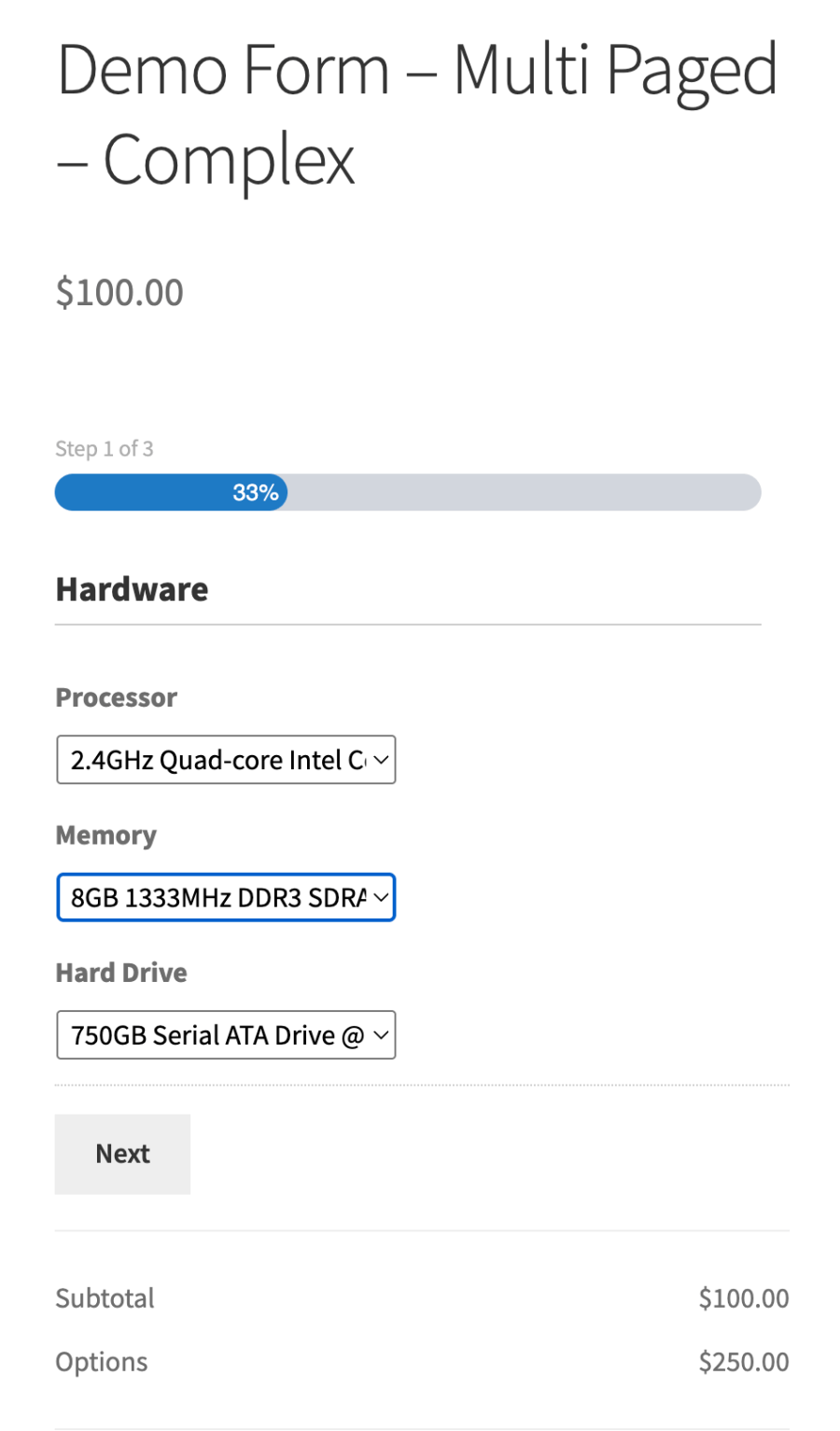
Multi-step product configuration form with hardware options and real-time pricing
A multi-page product form with hardware configuration options and real-time price calculation.

Real-time pricing that reflects every choice

When customers select options that affect cost, the product price updates dynamically on the page. Use Gravity Forms pricing fields — products, options, quantities, and shipping — and the extension calculates the total in real time. Customers see exactly what they are paying for before they add anything to the cart.

You have full control over how pricing appears. Display the base price with a label like “Starting at $50”, hide the default WooCommerce price entirely for quote-based products, or customize the subtotal, options, and grand total labels individually. The pricing display adapts to your business model, not the other way around.
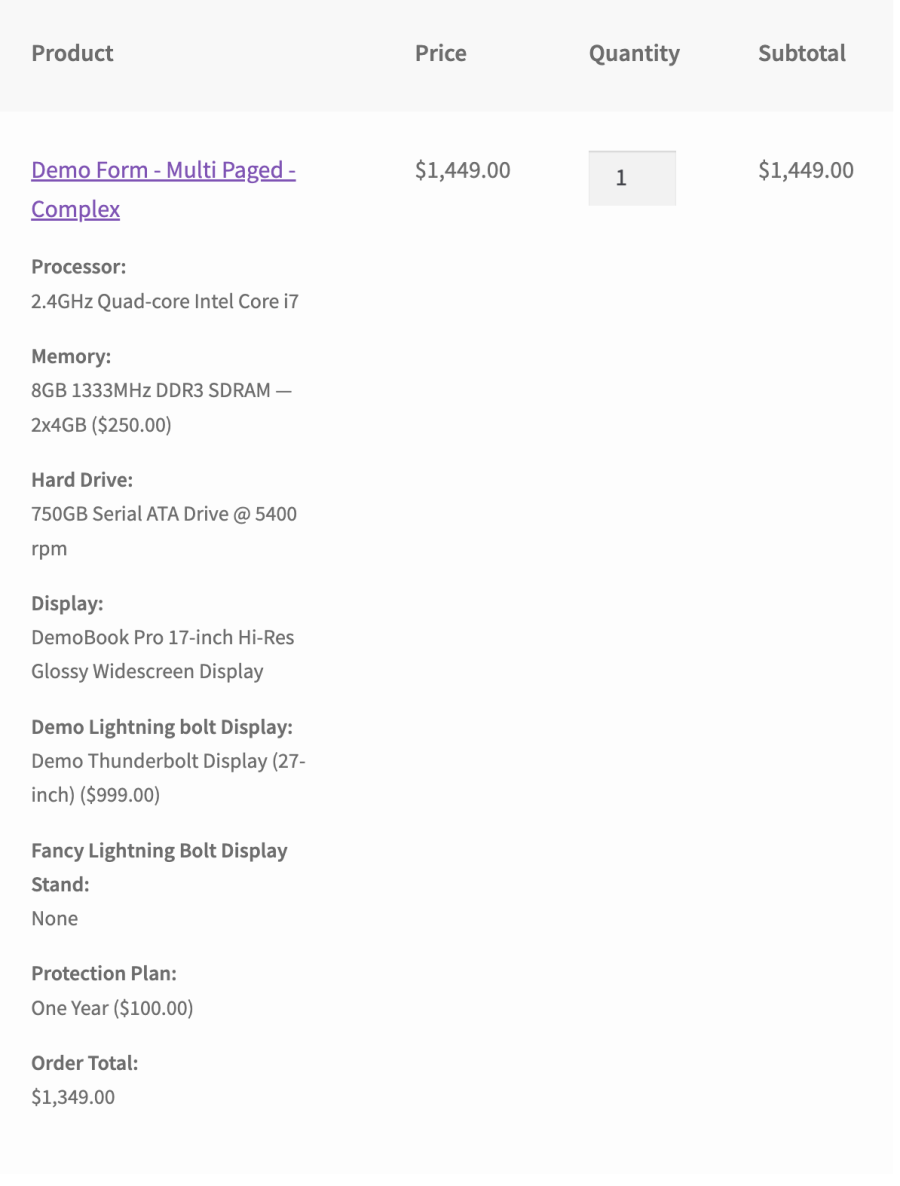
WooCommerce cart showing detailed form field data for a configured product
Every form selection flows into the cart as detailed line item metadata.

Deep WooCommerce integration — not just a form embed

This is not a shortcode that drops a form on a page. Gravity Forms Product Add-Ons is engineered to integrate at every level of the WooCommerce purchase flow:
  • Smart cart handling — Each unique form configuration is tracked as a distinct cart item. Identical configurations are automatically grouped and their quantities incremented. No duplicates, no confusion.
  • Complete order data — Every field the customer fills out appears as order item metadata, visible in admin order screens, customer emails, order confirmations, and the My Account order view. Nothing is lost between the form and the order.
  • One-to-one entry linking — Each order line item creates a proper Gravity Forms entry, linked directly to the WooCommerce order item. Jump from the order to the entry, or from the entry back to the order. Transaction status, payment details, and order status sync automatically as the order progresses.
  • Cart editing — Let customers click an item in the cart to return to the product page with their previous selections pre-filled, then update and replace the item. No need to remove and re-add.
  • Reorder support — Customers can reorder previous purchases with form data pre-populated from the original order, making repeat purchases fast and accurate.
  • Inventory-aware stock management — Map a form quantity field to control WooCommerce stock deductions, so inventory stays accurate even when quantities come from form input rather than the standard quantity selector.
  • Entry export with WooCommerce context — Export Gravity Forms entries with associated order number, order status, product name, and other WooCommerce fields included. Filter exports by order status to work only with completed, refunded, or any other status you need.
  • Notification control — Gravity Forms notifications are suppressed by default during the add-to-cart process and only fire when the actual order is placed. Enable or disable notifications per product to match your workflow.
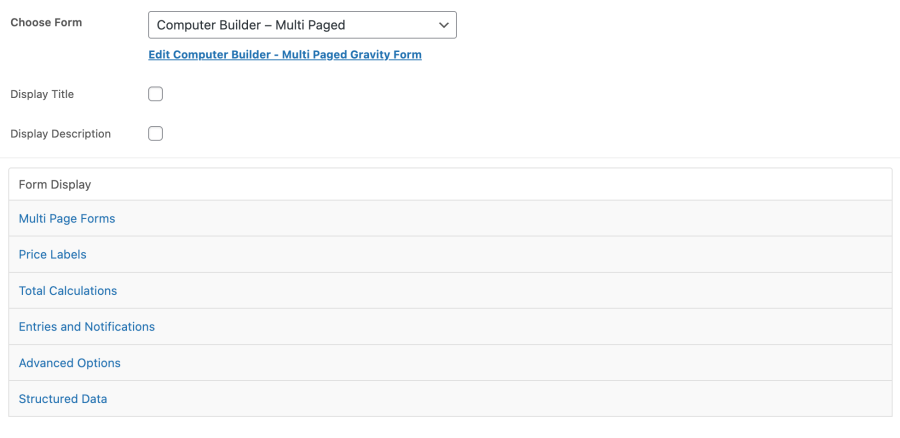
Product editor showing Gravity Forms configuration with expandable settings panels
Setup is simple: choose a form, then fine-tune pricing display, calculations, entries, and advanced options.

Use the full power of Gravity Forms

Build your product forms with the same tools you use everywhere else in Gravity Forms. Conditional logic, multi-page forms, file uploads, date pickers, address fields, calculations, conditional submit button logic — it all works. If you can build it in Gravity Forms, you can attach it to a WooCommerce product.

Pricing fields (products, options, totals, quantity, shipping) integrate directly with the WooCommerce cart total. Standard and advanced fields (text, dropdowns, checkboxes, radio buttons, numbers, names, email, phone, file upload, list fields, and more) pass their data through to orders and emails seamlessly.

Broad compatibility with the tools you already use

Gravity Forms Product Add-Ons works with the WooCommerce and Gravity Forms ecosystem — not against it:

  • Simple and variable products — Attach forms to any product type. For variable products, the form appears after a variation is selected.
  • WooCommerce Subscriptions — Full support for subscription products, including proper entry handling on renewal orders.
  • WooCommerce Bookings — Attach configuration forms to bookable products.
  • WooCommerce Dynamic Pricing — When Dynamic Pricing is active, the real-time price calculation automatically factors in pricing rules alongside form option costs. Both extensions are built by Element Stark and are designed to work together.
  • WooCommerce Bulk Variations — Attach a separate form specifically for the bulk order view. Also built by Element Stark.
  • Gravity Perks Nested Forms — Compatible with Gravity Wiz nested form fields for complex multi-item configurations.
  • Quick View Pro — Forms render and function correctly inside quick view modals.
  • WooCommerce Cart and Checkout Blocks — Fully compatible with the modern block-based cart and checkout experience.
  • High-Performance Order Storage (HPOS) — Built for WooCommerce’s current order storage architecture.

Structured data and SEO control

When your product’s base price is $0 because the real price comes from form options, Google’s structured data can display incorrect pricing. This extension lets you override the structured data price range so search engines show accurate information for your configurable products — no additional SEO plugin required.

Built for developers who need to extend it

Dozens of filters and actions let you customize every aspect of the integration — cart item data, order meta display, pricing calculations, field visibility, notification behavior, validation messages, and more. Full support for Gravity Forms logging makes debugging straightforward. The codebase has been refined over 13 years of real-world store usage, and the hooks are stable and well-documented.

See it in action

Browse the live demo store to see Gravity Forms Product Add-Ons working with pizza builders, donation forms, configurable book products, and more.

Requirement: This extension requires the Gravity Forms plugin (any license level). Gravity Forms is sold separately.


Customer reviews

Average rating 3.4
26 reviews
5 stars, 54% of reviews
4 stars, 8% of reviews
3 stars, 0% of reviews
2 stars, 0% of reviews
1 star, 38% of reviews
26 reviews
  • Freddy
    Rated 1 out of 5
    Support
    Feb 25, 2026
    Support
    When the plugin stopped working properly after a recent update, I reached out to the support team to explain the problems and what i suspect the cause was. The person that reply only repeated what i had already said in my original message, but didn't provide any solution. I sent a reply, but didn't get any reply from the support team for 3 days. I sent another email to follow up, but they still have not reply up to now.
  • Brenda de Graaf
    Rated 5 out of 5
    Ease of use
    Oct 29, 2025
    Ease of use
  • Wilbert van Boxtel
    Rated 1 out of 5
    Functionality
    Mar 28, 2025
    Functionality
    Plugin version 3.6.7 does not work anymore after updating to Woocommerce version 9.7.1. Please help!
  • Priya
    Rated 4 out of 5
    Support
    Oct 17, 2024
    Support
    I've been waiting for a reply from support to resolve an issue for five days. Still, they haven't replied.
  • Ratna Colluru
    Rated 5 out of 5
    Ease of use
    Sep 4, 2024
    Ease of use
    We have been using Gravity Forms Product Add-ons for more than 2 years now and absolutely love it. It allowed us to use Gravity Forms with Woocommerce to provide different forms of payment and currencies.

Extension information

  • Tested with WordPress: 6.9
  • Tested with WooCommerce: 10.4
  • Requires at least WordPress: 3.1
  • Requires at least WooCommerce: 9.0

Compatibility

  • Cart & checkout blocks
  • High performance order storage (HPOS)

Countries

  • Worldwide

Requirements

  • Gravity Forms plugin is required

Related Products

Price $29 annually
Rated 3.5 out of 5 stars
Price $279 annually
Rated 3.2 out of 5 stars
Price $49 annually
Rated 2.7 out of 5 stars
Price $199 annually
Rated 4 out of 5 stars
Price $39 annually
Rated 3 out of 5 stars
Price $79 annually
Rated 4.2 out of 5 stars
Price $119 annually
Rated 3.5 out of 5 stars
Price $109 annually
Rated 4.6 out of 5 stars
Price $249 annually
Rated 2.7 out of 5 stars

